

Download Torrex Surface Edition – Fast Torrent Streaming Client for Windows & macOS
Torrex Surface Edition is a modern torrent download client that blends the classic power of peer‑to‑peer file sharing with a sleek, media‑first experience. Unlike traditional torrent apps that force you to wait until a file is fully downloaded, Torrex begins streaming movies, TV shows, and music almost instantly. The built‑in media player eliminates the need to switch between programs, letting you watch or listen while the download continues in the background.
Designed with a clean, rose‑red interface, Torrex offers enough customization to respect bandwidth caps, while remaining approachable for users of all skill levels. Whether you’re a casual movie lover looking for a quick way to preview a film, or a music aficionado who wants to sample tracks before the torrent finishes, Torrex Surface Edition delivers a secure, fast, and user‑friendly solution. Its cross‑platform support—including Windows 10/11, macOS 10.15+, and optional Android/iOS companion apps—means you can start a torrent on your desktop and continue streaming on the go.
All of this is offered for free, with regular updates that keep the client secure and compatible with the latest torrent protocols. In short, Torrex Surface Edition redefines how you consume media via torrents, turning a traditionally waiting‑heavy process into a seamless, on‑demand streaming experience.
Key Features of Torrex Surface Edition
- Instant streaming of partially downloaded media
- Integrated media player with subtitle support
- Bandwidth‑aware throttling and scheduling
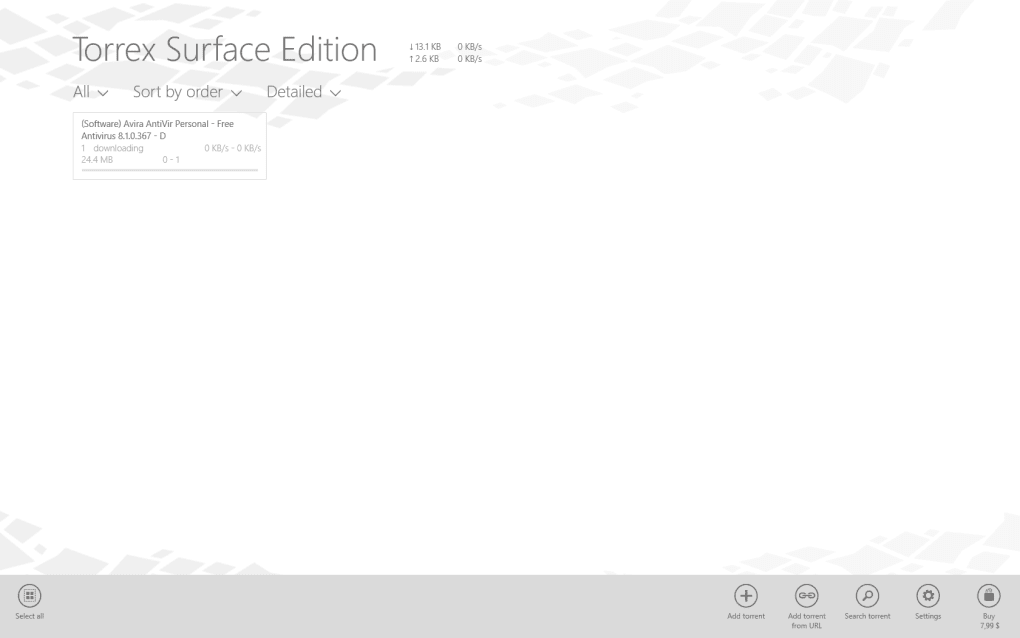
- Rose‑red UI that’s both modern and intuitive
- Secure connections with protocol encryption
- Cross‑platform support (Windows, macOS, Android, iOS)
- Automatic updates and built‑in malware scanning
- Customizable torrent filters and RSS feeds
The standout feature of Torrex Surface Edition is its ability to start streaming a torrent after just a few percent of the file has been downloaded. The client analyses the file type and selects the optimal buffer size, ensuring smooth playback without stuttering. The integrated media player supports popular video codecs, audio formats, and even external subtitle files, making it a one‑stop shop for entertainment.
For users concerned about data caps, Torrex includes a bandwidth‑aware throttling system that lets you set daily or hourly limits, and schedule downloads during off‑peak hours. The UI, brushed in a distinctive rose‑red palette, offers a modern feel without sacrificing clarity; every button and menu is labeled clearly, and dark mode is available for low‑light environments. Security is taken seriously: all connections are encrypted using the latest protocol standards, and the client automatically scans incoming files for known malware signatures.
Compatibility extends beyond the desktop: a lightweight companion app for Android and iOS syncs with your desktop library, letting you continue playback on mobile devices. Regular automatic updates keep the software current, while an RSS feed manager helps you stay on top of new releases in your favorite categories. Overall, Torrex Surface Edition packs a powerful feature set into a clean, user‑centric package.
Installation, Setup, and Compatibility
Torrex Surface Edition runs natively on Windows 10, Windows 11, and macOS 10.15 (Catalina) or later. Linux users can operate the client via Wine or a dedicated Docker container, though official support is limited to the two primary desktop platforms.
Installation steps (Windows & macOS):
1. Visit the official Torrex website and click the “Download for Windows” or “Download for macOS” button.
2. Run the installer (TorrexSetup.exe or TorrexInstaller.dmg).
The wizard will guide you through the standard steps: accept the license agreement, choose an installation folder, and select optional shortcuts.
3. After installation, launch Torrex Surface Edition. The first‑time startup wizard asks you to configure default download locations, bandwidth limits, and whether you want automatic updates enabled.
4.
Sign in with a free Torrex account to sync preferences across devices. (Account creation is optional but recommended for cloud‑based RSS feed syncing.)
5. Import existing .torrent files or paste magnet links to begin downloading. The client will automatically detect media files and enable instant streaming.
Using the built‑in player: Once a torrent starts, a thumbnail preview appears in the download list. Click the play button to launch the integrated player. You can adjust playback speed, toggle subtitles, and switch audio tracks directly within the window. If you prefer an external player, Torrex offers a “Open with external app” option that respects your system’s default media associations.
Mobile companion apps: For Android and iOS, download the Torrex Companion from Google Play or the App Store. After logging in with the same account, your desktop library syncs automatically, and you can stream any active torrent without re‑downloading the file. The mobile apps also support push notifications for download completion and bandwidth alerts.
Pros, Cons, and Frequently Asked Questions
Pros
- Instant streaming reduces waiting time dramatically.
- All‑in‑one media player eliminates the need for third‑party apps.
- Bandwidth throttling helps stay within ISP caps.
- Secure, encrypted connections protect privacy.
- Cross‑platform support and mobile sync keep you connected.
Cons
- Linux support is unofficial and requires workarounds.
- Advanced users may miss deeper configuration options found in older clients.
- Occasional buffering on very low‑speed connections.
- Free version includes optional ads in the UI (removable with a one‑time purchase).
Frequently Asked Questions
Is Torrex Surface Edition really free?
Yes, the core client is completely free. It includes all streaming, downloading, and basic management features. A small, optional ad banner appears in the interface, and a one‑time purchase removes it permanently.
Can I stream a torrent before the entire file is downloaded?
Absolutely. Torrex begins streaming after roughly 5‑10 % of the file is available, depending on the media type and your connection speed. The built‑in player buffers intelligently to avoid interruptions.
How does Torrex protect my privacy?
All peer connections are encrypted using the latest protocol standards (AES‑256). The client also supports VPN passthrough, and it never logs your IP addresses or download history on its servers.
Is there a limit to the number of simultaneous streams?
The free version allows up to three simultaneous streaming sessions. If you need more, the premium upgrade raises the limit to unlimited concurrent streams.
Can I use Torrex on a low‑end PC or older Mac?
Yes. Torrex is lightweight and runs comfortably on systems with as little as 2 GB RAM and a dual‑core CPU. The UI automatically scales to lower resolutions, and you can disable the visualizer to conserve resources.
Conclusion and Call to Action
Torrex Surface Edition bridges the gap between classic torrent downloading and modern media consumption. Its instant‑streaming capability, secure architecture, and polished UI make it a compelling choice for anyone who values speed and convenience. While power users may miss some deep‑level tweaks, the overall experience is smooth enough to satisfy both beginners and seasoned torrenters.
The free tier provides a fully functional client, and the optional premium upgrade removes ads and unlocks unlimited streams for those who need them. If you’ve been waiting for a torrent client that lets you start watching movies or listening to music without the long wait, Torrex Surface Edition is the answer. Download it today, set your bandwidth limits, and enjoy a seamless streaming experience directly from your torrents.







